Getting started
Welcome to our docs! Learn how to get started with the CommonGrants protocol.
Looking to jump right in? Skip to the quickstart tutorial to define a CommonGrants API using TypeSpec and explore the core routes and models defined by the protocol.
Find your way around
Section titled “Find your way around”Not looking for a quickstart guide? Here are some other resources to help you get started:
Quickstart
Section titled “Quickstart”In this tutorial you will:
- Define a CommonGrants API specification with TypeSpec
- Compile it to OpenAPI and preview it with Swagger
- Add a custom field and see it in the docs
You’ll end up with an API specification and a docs preview, not a running API.
First steps
Section titled “First steps”Set up and preview the default CommonGrants API specification.
1. Create a new directory for your project
Section titled “1. Create a new directory for your project”mkdir common-grants-quickstartcd common-grants-quickstart2. Create a package.json file
Section titled “2. Create a package.json file”{ "name": "common-grants-quickstart", "private": true, "type": "module"}3. Install the dependencies
Section titled “3. Install the dependencies”pnpm stops on unapproved install scripts. Create pnpm-workspace.yaml to skip the one optional script in the CLI’s dependencies:
allowBuilds: "@scarf/scarf": falseThen install the packages:
pnpm add --save-exact @common-grants/core@0.5.0 @common-grants/cli@0.5.1 @typespec/compiler@1.17.0 @typespec/http@1.17.0 @typespec/openapi@1.17.0 @typespec/openapi3@1.17.0 @typespec/json-schema@1.17.0 @typespec/rest@0.87.0 @typespec/versioning@0.87.0npm install --save-exact @common-grants/core@0.5.0 @common-grants/cli@0.5.1 @typespec/compiler@1.17.0 @typespec/http@1.17.0 @typespec/openapi@1.17.0 @typespec/openapi3@1.17.0 @typespec/json-schema@1.17.0 @typespec/rest@0.87.0 @typespec/versioning@0.87.0bun add --exact @common-grants/core@0.5.0 @common-grants/cli@0.5.1 @typespec/compiler@1.17.0 @typespec/http@1.17.0 @typespec/openapi@1.17.0 @typespec/openapi3@1.17.0 @typespec/json-schema@1.17.0 @typespec/rest@0.87.0 @typespec/versioning@0.87.04. Create the TypeSpec project files
Section titled “4. Create the TypeSpec project files”import "@typespec/http";import "@typespec/versioning";import "@common-grants/core";
import "./routes.tsp";
/** API description here */@service(#{ title: "Quickstart API" })@Versioning.useDependency(CommonGrants.Versions.v0_5)namespace Quickstart;import "@common-grants/core";
using TypeSpec.Http;
@tag("Opportunities")@route("/common-grants/opportunities")namespace Quickstart.Routes { alias OpportunitiesRouter = CommonGrants.Routes.Opportunities;
op list is OpportunitiesRouter.list; op read is OpportunitiesRouter.read; op search is OpportunitiesRouter.search;}emit: - "@typespec/json-schema" - "@typespec/openapi3"5. Compile your API specification
Section titled “5. Compile your API specification”pnpm exec cg compile main.tspnpm exec -- cg compile main.tspbun run cg compile main.tsp6. Preview your API specification at http://localhost:3000
Section titled “6. Preview your API specification at http://localhost:3000”pnpm exec cg preview tsp-output/@typespec/openapi3/openapi.Quickstart.yamlnpm exec -- cg preview tsp-output/@typespec/openapi3/openapi.Quickstart.yamlbun run cg preview tsp-output/@typespec/openapi3/openapi.Quickstart.yamlPress Ctrl+C in the terminal to stop the preview server when you’re done.
Deep dive
Section titled “Deep dive”A closer look at the files and packages you just created. To skip ahead, go to Customization.
Explore the files you created
Section titled “Explore the files you created”Your project directory now contains the following files:
- main.tsp # Defines the API service
- routes.tsp # Defines the API routes
- tspconfig.yaml # Configures TypeSpec emitters (e.g. OpenAPI)
- package.json # Manages project dependencies
- pnpm-workspace.yaml # pnpm only: skips an optional install script
Directorytsp-output/ # Created when you compile
- …
We’ll focus on exploring the following files in particular:
Understanding routes.tsp
Section titled “Understanding routes.tsp”The routes.tsp file is the TypeSpec file that defines the API routes.
import "@common-grants/core";
using TypeSpec.Http;
@tag("Opportunities")@route("/common-grants/opportunities")namespace Quickstart.Routes { alias OpportunitiesRouter = CommonGrants.Routes.Opportunities;
op list is OpportunitiesRouter.list; op read is OpportunitiesRouter.read; op search is OpportunitiesRouter.search;}Since there’s a lot happening here, let’s break it down section by section.
-
Import the CommonGrants TypeSpec library.
import "@common-grants/core"; -
Expose the
TypeSpec.Httpnamespace.using TypeSpec.Http;This makes the
@routedecorator available in the current namespace without requiring theTypeSpec.Httpprefix. (@tagis built into TypeSpec and needs no import.) -
Define a namespace for the
OpportunitiesRouter.@tag("Opportunities")@route("/common-grants/opportunities")namespace Quickstart.Routes {alias OpportunitiesRouter = CommonGrants.Routes.Opportunities;// operations omitted for brevity}Think of the
OpportunitiesRouteras a controller in a traditional MVC framework that groups related routes together under theOpportunitiestag and exposes them at the/common-grants/opportunitiespath. -
Expose the default routes from the CommonGrants library.
@tag("Opportunities")@route("/common-grants/opportunities")namespace Quickstart.Routes {alias OpportunitiesRouter = CommonGrants.Routes.Opportunities;op list is OpportunitiesRouter.list;op read is OpportunitiesRouter.read;op search is OpportunitiesRouter.search;}This exposes the following default routes from the CommonGrants library:
GET /common-grants/opportunitiesGET /common-grants/opportunities/{oppId}POST /common-grants/opportunities/search
Understanding main.tsp
Section titled “Understanding main.tsp”The main.tsp file is the TypeSpec file that defines the API service.
import "@typespec/http";import "@typespec/versioning";import "@common-grants/core";
import "./routes.tsp";
/** API description here */@service(#{ title: "Quickstart API" })@Versioning.useDependency(CommonGrants.Versions.v0_5)namespace Quickstart;Let’s break down the main.tsp file section by section.
-
Import the TypeSpec libraries and the
routes.tspfile.import "@typespec/http";import "@typespec/versioning";import "@common-grants/core";import "./routes.tsp";Importing the
routes.tspincludes the routes from that file in the OpenAPI document generated when you compile. -
Define the API service.
/** API description here */@service(#{ title: "Quickstart API" })@Versioning.useDependency(CommonGrants.Versions.v0_5)namespace Quickstart;This defines the API service with a title of “Quickstart API”. The
@servicedecorator is required for the OpenAPI emitter to work. Thetitleproperty is used to set the title of the API and the docstring is used to set the description of the API in the OpenAPI docs. -
Specify the version of the CommonGrants protocol to use.
/** API description here */@service(#{ title: "Quickstart API" })@Versioning.useDependency(CommonGrants.Versions.v0_5)namespace Quickstart;This specifies that the Quickstart API should use the models and routes defined in the v0.5 version of the CommonGrants protocol.
Understanding tspconfig.yaml
Section titled “Understanding tspconfig.yaml”The tspconfig.yaml file is the TypeSpec configuration file that defines the emitters for the project.
emit: - "@typespec/json-schema" - "@typespec/openapi3"This configures the TypeSpec compiler to emit the API definition as an OpenAPI document and a JSON Schema.
Explore the packages you installed
Section titled “Explore the packages you installed”You installed the following packages:
@common-grants/coreThe CommonGrants TypeSpec library, which includes a default set of models and routes that can be used to define your own CommonGrants API.@common-grants/cliThe CommonGrants CLI (cg), which compiles your TypeSpec project and previews the OpenAPI document with Swagger UI.@typespec/compilerThe TypeSpec compiler (tsp).@typespec/openapi3The OpenAPI emitter for TypeSpec, which emits the CommonGrants API definition as an OpenAPI document.@typespec/json-schemaThe JSON Schema emitter for TypeSpec, which emits the models in your CommonGrants API as JSON Schemas.@typespec/http,@typespec/openapi,@typespec/rest, and@typespec/versioningSupporting TypeSpec libraries that the CommonGrants library depends on.
Explore the files created by compiling
Section titled “Explore the files created by compiling”Compiling creates a tsp-output directory with the following files compiled from main.tsp:
Directory
tsp-output/Directory
@typespec/Directory
openapi3/Auto-generated by the OpenAPI emitteropenapi.Quickstart.yamlThe Quickstart API specopenapi.CommonGrants.API.<version>.yamlOne base CommonGrants API spec per protocol version
Directory
json-schema/Auto-generated by the JSON Schema emitterCustomField.yamlOpportunityBase.yaml- …
Understanding the cg preview command
Section titled “Understanding the cg preview command”The cg preview command starts a local server that serves the OpenAPI specification using Swagger UI. View your API specification at http://localhost:3000.
The server reads the spec file once when it starts. If you recompile, stop the server with Ctrl+C and start it again to see your changes.
Customization
Section titled “Customization”Extend the base CommonGrants specification with a custom field.
Add a custom field to the Opportunity model
Section titled “Add a custom field to the Opportunity model”Create a new file called models.tsp with the following code:
import "@common-grants/core";
// Allows us to use models defined in the specification library// without prefixing each model with `CommonGrants`using CommonGrants.Models;using CommonGrants.Fields;
namespace Quickstart.Models;
model ProgramArea extends CustomField {  name: "programArea";  fieldType: CustomFieldType.string;  value: string;  description: "Primary focus area of the grant program.";}
// Create a custom Opportunity type by extending the base modelmodel CustomOpportunity extends OpportunityBase {  @example(#{    programArea: #{      name: "programArea",      fieldType: CustomFieldType.string,      value: "Healthcare Innovation",      description: "Primary focus area of the grant program.",    },  })  customFields: {    programArea: ProgramArea;  };}
There’s a lot happening here, so let’s break it down section by section.
-
Import the CommonGrants TypeSpec library.
import "@common-grants/core"; -
Make the CommonGrants fields, models, etc. available in the current namespace.
using CommonGrants.Models;using CommonGrants.Fields;Without this, you would have to prefix each model with
CommonGrants.Modelsand each field withCommonGrants.Fields. For exampleCommonGrants.Fields.CustomField. -
Declare a namespace for the current file.
namespace Quickstart.Models; -
Define a custom field by extending the
CustomFieldmodel.model ProgramArea extends CustomField {name: "programArea";fieldType: CustomFieldType.string;value: string;description: "Primary focus area of the grant program.";}The
ProgramAreamodel defines literal values for the field’sname,fieldType, anddescriptionmetadata properties, and requires thevalueproperty to be a string. -
Extend the
OpportunityBasemodel to include this custom field.model CustomOpportunity extends OpportunityBase {// Example omitted for brevitycustomFields: {programArea: ProgramArea;};}It also provides an example of the updated
customFieldsproperty, which will be displayed in the OpenAPI docs.model CustomOpportunity extends OpportunityBase {@example(#{programArea: #{name: "programArea",fieldType: CustomFieldType.string,value: "Healthcare Innovation",description: "Primary focus area of the grant program.",},})customFields: {programArea: ProgramArea;};}
Update the default routes
Section titled “Update the default routes”Replace routes.tsp with the following. Highlighted lines are new or changed:
import "@common-grants/core";import "./models.tsp";
using TypeSpec.Http;
@tag("Opportunities")@route("/common-grants/opportunities")namespace Quickstart.Routes {  alias OpportunitiesRouter = CommonGrants.Routes.Opportunities;
  op list is OpportunitiesRouter.list<Models.CustomOpportunity>;  op read is OpportunitiesRouter.read<Models.CustomOpportunity>;  op search is OpportunitiesRouter.search<Models.CustomOpportunity>;}
Let’s explain these changes section by section.
-
Import the
models.tspfile to expose theCustomOpportunitymodel.import "./models.tsp"; -
Update the default routes to use the
CustomOpportunitymodel.@tag("Opportunities")@route("/common-grants/opportunities")namespace Quickstart.Routes {alias OpportunitiesRouter = CommonGrants.Routes.Opportunities;op list is OpportunitiesRouter.list<Models.CustomOpportunity>;op read is OpportunitiesRouter.read<Models.CustomOpportunity>;op search is OpportunitiesRouter.search<Models.CustomOpportunity>;}This updates the following routes to return our
CustomOpportunitymodel instead of the default model from the CommonGrants library:GET /common-grants/opportunitiesreturns a paginated list ofCustomOpportunityitems.GET /common-grants/opportunities/{oppId}returns a singleCustomOpportunity.POST /common-grants/opportunities/searchreturns a paginated list of matchingCustomOpportunityitems.
View your changes
Section titled “View your changes”Stop the preview server from earlier with Ctrl+C if it’s still running, then recompile and start it again:
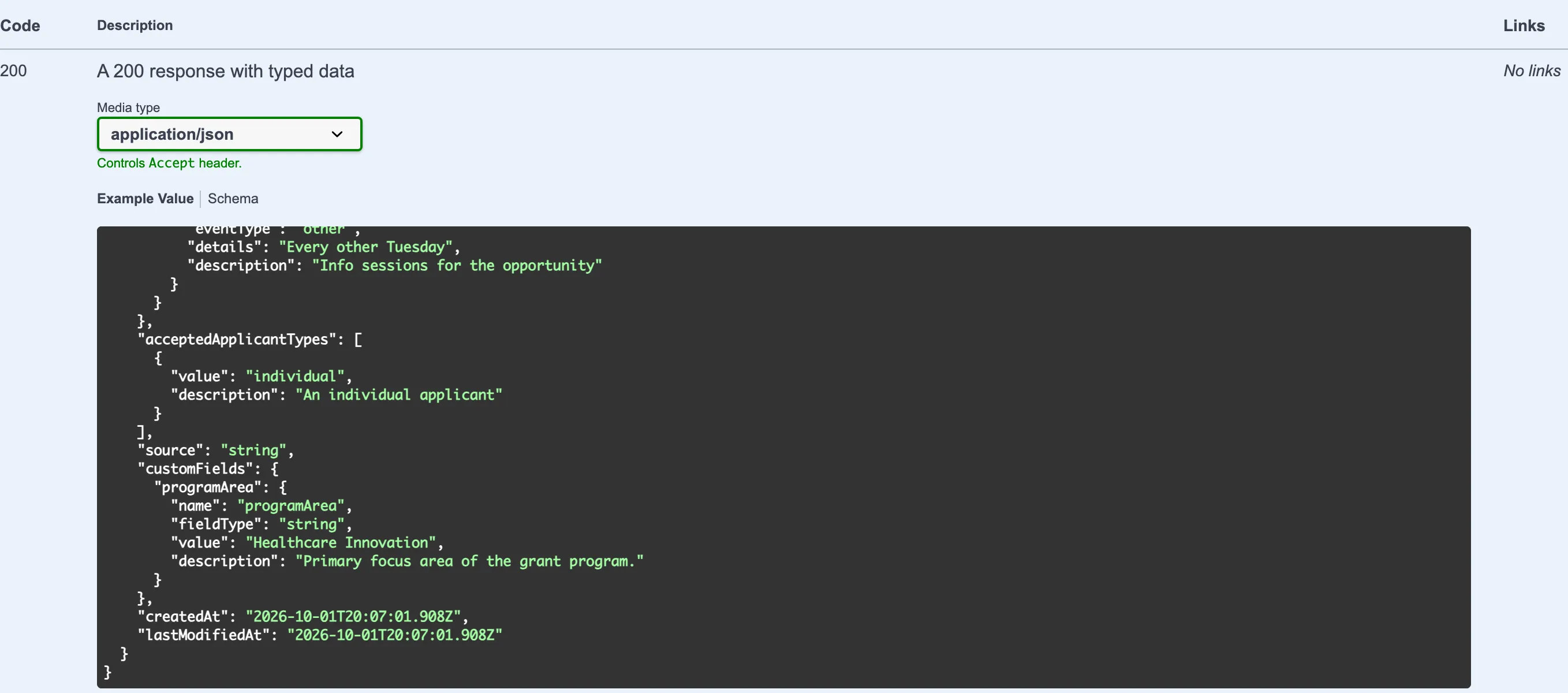
pnpm exec cg compile main.tsppnpm exec cg preview tsp-output/@typespec/openapi3/openapi.Quickstart.yamlnpm exec -- cg compile main.tspnpm exec -- cg preview tsp-output/@typespec/openapi3/openapi.Quickstart.yamlbun run cg compile main.tspbun run cg preview tsp-output/@typespec/openapi3/openapi.Quickstart.yamlOpen http://localhost:3000/#/Opportunities/Routes_read. The example response’s customFields now includes programArea:
Next steps
Section titled “Next steps”Learn more about the CommonGrants protocol:
Learn more about TypeSpec: